In-Game Overlay
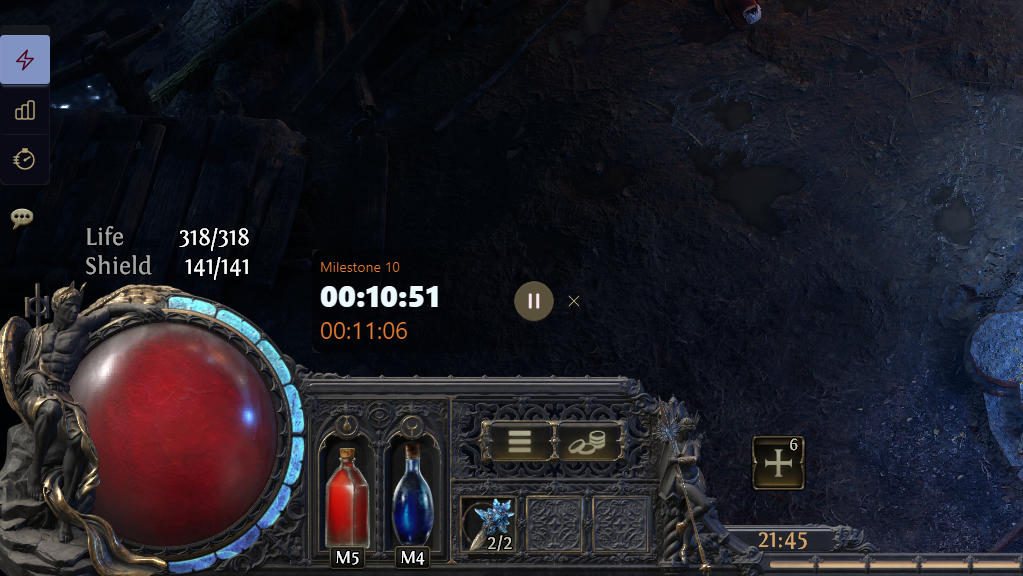
Controlled by Settings → In-Game Sidebar Overlay:
| Setting | Behavior |
|---|---|
| Auto-detect | Shows the overlay in-game on a single monitor. Hidden on multiple monitors (dashboard only). |
| Enabled | Always shows the In-Game Overlay in-game, including on multiple monitors. |
| Disabled | Hides the In-Game Overlay; use the dashboard sidebar only. |
When no game is running, only the dashboard is shown.
Available Features
Game-dependent controls on the overlay strip:
- Speed Leveling Tracker
- Experience Meter
- Gold Meter
- Instance Alert (Path of Exile / Path of Exile 2)
- Sigils (Diablo IV)
Feature Modes
Features fall into two groups depending on how the dashboard and in-game overlay interact.
Exclusive: Experience Meter, Gold Meter, Instance Alert
- The feature lives on the dashboard or on your game screen, not both.
- Overlay preference in Settings → Game Configuration decides the default surface.
- Opening the feature on one surface moves it from the other.
Dual: Speed Leveling Tracker, Sigils
- The dashboard view and in-game can both be opened at the same time.
- The dashboard sidebar controls the dashboard view; the overlay strip controls the in-game widget.
- The overlay toggle inside the feature only opens or closes the in-game widget.
Dashboard vs. In-Game Overlay
The Dashboard sidebar and In-Game Overlay strip each control their own surface.
Highlighting
- Dashboard sidebar
- Leveling / Sigils: Active when the dashboard view is open whether it be on the dashboard or in the feature window.
- Meters: Active when the meter is open on the dashboard or overlay (while on the Dashboard route).
- In-Game Overlay strip: Active when that feature's in-game widget is open.
Dashboard
| Feature | Behavior |
|---|---|
| Meters | Follow overlay preference in Settings → Game Configuration. Preference off: dashboard pane (migrates from overlay if needed). Preference on: overlay only; if already on overlay, click closes overlay without opening the dashboard pane. |
| Leveling / Sigils | Opens or closes the dashboard view only (Leveling panel or Sigils per Open Features Window); does not affect the in-game overlay. |
In-Game Overlay
| Action | Behavior |
|---|---|
| Open | Opens overlay and syncs the matching overlay toggle on. |
| Close | Meters' toggle remains unchanged. Leveling and Sigils turns the overlay toggle off. |
| Meter on dashboard | Migrates to overlay; preference on. |
Overlay Toggles
- Settings → Game Configuration (Meter overlays)
- Toggling migrates an open meter between dashboard and overlay.
- Speed Leveling Tracker panel or Inventory (Overlay toggle)
- Opens or closes the in-game widget only; does not open, close, or navigate the dashboard view.