Class Detection
Legacy
As of dIVa v2.5.0, Path of Exile 2 uses Overwolf game events for class detection and no longer uses manual class selection.
This document describes the legacy manual class selection flow and is kept for reference.
How It Works
- Initial Login Detection: When you log into Path of Exile 2, dIVa detects your character but cannot automatically determine the class from game events.
- Class Selection Dialog:
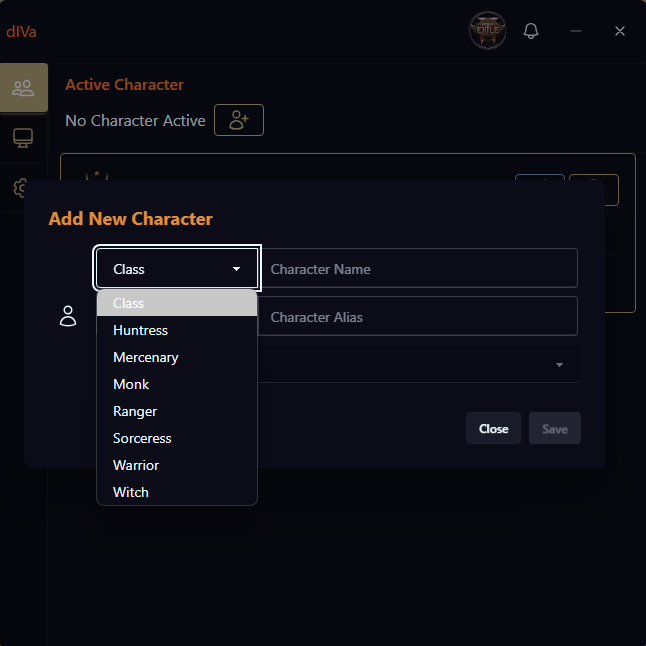
A prompt will appear asking you to select your character's class from the available options:
- Huntress
- Mercenary
- Monk
- Ranger
- Sorceress
- Warrior
- Witch
Character Association: Once you select the class, dIVa associates it with your character name for future reference.
Automatic Recognition: The next time you log in with the same character, dIVa will automatically recognize the class without prompting.
Video Overview
Approaches for Existing Characters new to dIVa
- Create a New dIVa Character & Sync
- Create a new dIVa Character
- Start Offline leveling to correct Milestone; meaning, if your Character is Level 23, you'll need to click Next Milestone to set it to 20.
- With Leveling active, log into Path of Exile 2 and select your corresponding Character.
- dIVa will detect your Character given Name matches, and show Which Character Is This? Click Sync Characters to link your offline run to the live game character.
- dIVa will update your character's level and begin online tracking. See Syncing Game Characters for details.
- First-Time Detection
- When you first launch dIVa with an existing Path of Exile 2 character, you'll be prompted to select their class just once.
- Milestones in Leveling: dIVa will track your character's progress from this point, meaning if your Character is level 23 as an example, the first Milestone in leveling data will be Milestone 20, not Milestone 1 (Start)
Important Note regarding Milestones
A Milestone is every 10 levels.
Start, or Milestone 1, begins at level 1 to 9.
Milestone 10 begins at level 10 to 19.
Milestone 20 begins at level 20 to 29.