Characters
The management of character aliases has been improved with a dedicated Characters feature. This feature opens in its own window, providing a streamlined interface for managing your characters and updating character-specific data for each game more efficiently. You can also create new characters directly from this screen.

Functionality
- Class Icon: Displays the character's class.
- Character Name: Displays the character's name.
- Active Character: The run dIVa is currently tracking. An offline icon indicates you loaded the run manually and it has not yet synced with live game events.
- Favorite: Auto-selects the alias when a character with the same attributes logs in at the exact same level. Shown as a star on the Characters list.
- Remove: Delete the Character and all its data.
- Alias: Your label for a saved run. It can differ from your in-game character name and helps distinguish multiple runs for the same character.
- Level: Displays the alias' last known level.
- Actions: Perform actions on the alias such as Edit, Remove, or Mark as Favorite.
Adding a New Character
Diablo IV

Path of Exile 2

To create a new character, follow these steps:
- Click the Add Character button.
- In the dialog that appears:
- Class Icon: Use the dropdown to select the character class (e.g., Rogue, Barbarian, Witch)
- Gender (Diablo IV only): Select the character's gender
- Ascendancy (Path of Exile 2 only): Choose your character's ascendancy class
- Character Name: Enter the character's name
- Level: Input the character's level (numerical)
- Alias: Enter a unique alias to distinguish your character
- Class Icon: Use the dropdown to select the character class (e.g., Rogue, Barbarian, Witch)
- Once all the details are entered, click the Save button to add the character to your list. If you wish to discard your changes, click Close.
Syncing Game Characters
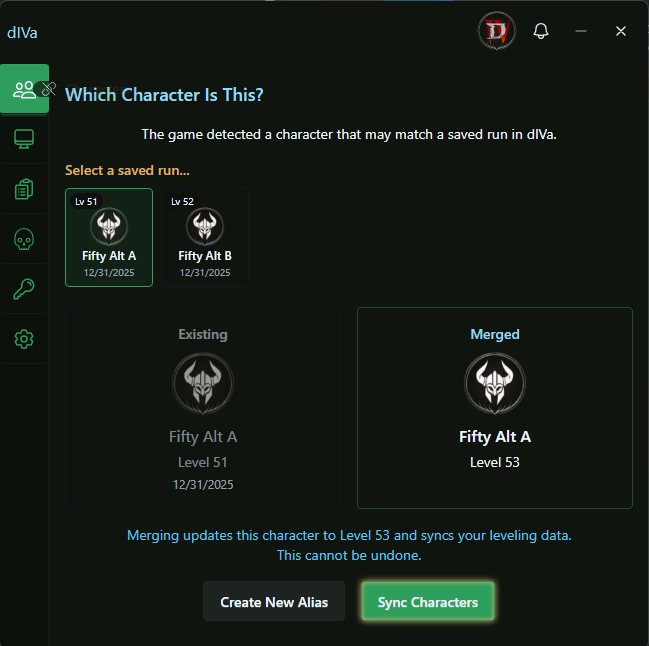
When you log into a game, dIVa matches the live character to your saved runs (aliases). Most of the time this happens automatically in the background. When dIVa cannot decide which run to use, it opens the Characters window and shows Which Character Is This?
When dIVa Syncs Automatically
dIVa syncs silently, without showing the resolution screen, in these common situations:
- First time in dIVa: No saved runs exist for this character. dIVa creates a new run using your in-game character name.
- Offline play: You have a saved run loaded offline and log into the same character. dIVa syncs into that run automatically, including large level jumps for unlinked runs.
- Offline swap: You have one run loaded offline, but the game matches a different saved run at the exact same level. dIVa switches to that run silently.
- Returning session: You played recently and your level increased by a small amount (up to 3 levels) on a previously linked run.
- Exact level match: Your in-game level matches a saved run and dIVa can tell which one to use: either only one run has that level, or your favorite is set among multiple runs at that level.
- Unambiguous linked run: Only one previously linked run qualifies for your current level and it was played recently.
- New milestone, name still available: All saved runs are outside your current level range and your in-game character name is not already used as an alias. dIVa creates a new run silently: no prompt.
When auto-sync completes with a level increase, you may see a notification that your character has merged with offline data.
When You'll See "Which Character Is This?"
dIVa asks you to choose when automatic matching is not safe or is ambiguous:
- Multiple saved runs in your current level range that could sync
- Inactive run: Your only saved run for this character has not been played in more than 30 days, even if the level matches exactly: dIVa shows when it was last played so you can confirm it is not an old alt from a previous season
- Large level jump: Your in-game level increased significantly since the last sync on a linked run (for example, more than 3 levels, or across a milestone boundary by more than 1 level)
- Ambiguous linked runs: More than one previously linked run qualifies for auto-sync
- Default name taken, no sync options: All saved runs are outside your current level range and your in-game character name is already used as an alias: dIVa opens straight to an alias name input
dIVa groups levels into ranges of 10 when offering saved runs to sync:
- Levels 1–9
- Levels 10–19
- Levels 20–29
Only saved runs in the same range as your current in-game level and at or below your current game level appear as sync candidates. Runs stored above your current game level are excluded: syncing would downgrade the saved run. Runs in other ranges still exist but are not offered for syncing on this screen.
Using the Resolution Screen
- dIVa opens the Characters window and displays Which Character Is This?
- If more than one saved run qualifies, use Select a saved run to pick the correct one. Each tile shows the stored level and, when available, when that run was last played.
- If your only matching run is inactive (not played in more than 30 days) and the level matches exactly, dIVa shows a confirmation message with the last-played date before you sync.
- Review the Existing and Merged preview cards. Your alias name stays the same; the level updates to match the game.
- Choose an action:
- Sync Characters: links live game data to the selected saved run
- Create New Alias: saves the detected character as a separate new run
When no saved runs qualify for sync and your in-game character name is already taken as an alias, dIVa shows a New Run preview and an alias name input directly: there are no Sync Characters or Create New Alias buttons in this case.
Create New Alias
- If your in-game character name is not already used as an alias, click Create New Alias once to start a new run.
- If the name is already taken, dIVa prompts you to enter a different alias before saving.
- If no saved runs appear in the carousel, there are no runs in your current level range to sync at your current game level. You can still create a new alias unless your in-game name is already taken: in that case, enter a unique alias in the input shown.
When the game level is higher than the stored level, syncing shows this warning:
Merging updates this character to a higher level and syncs your leveling data. This cannot be undone.
Common Scenarios
- Returning from offline play with one run: dIVa usually syncs silently when you log in, even across large level jumps.
- Offline run loaded, game matches a different saved run at the exact same level: dIVa switches to that run silently: no prompt.
- Two runs at levels 15 and 18, game at level 17: You are prompted to pick which run to sync, or create a new alias.
- Haven't played in two weeks: You are prompted even if your level matches exactly.
- Brand-new character in dIVa: No prompt: a new run is created automatically.
- All saved runs are in a lower level range, you are now level 32, and your character name is free: No prompt: a new run is created automatically.
- All saved runs are in a lower level range, you are now level 32, and your character name is already an alias: You are prompted to enter a new alias name: no sync options are shown.